Introduction:
So now that I finished my first REAL Android game – Wayve – I noticed a few things.
Mainly:
I hate Java- There really are no good Android game making tutorials – at least not on page one of Google.
- There’s a choice to make which really isn’t one to begin with – but more about that later.
So in my GLORIOUS QUEST to fix this problem I start(ed) this tutorial.
Setup:
To start programming in Android you need one thing first and foremost – an environment to compile Java code to Android APK files (think: installer packages). While you could use some commandline-based variant, I recommend using the Android Developer Tools (ADT) for Eclipse (which is an IDE for normal Java and some other languages). The whole thing is conveniently shipped together in the ADT bundle here.
This will net you a .zip file which you should probably not place on your desktop, but in a folder where you keep all your android related things.
Extract the file.
In it are basically three things:
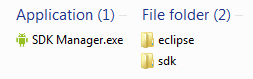
overwhelming.
- the SDK Manager, which allows you to install and update packages, like build tools, Android APIs and examples for various versions.
- the sdk folder, which contains the Android SDK files you need for compiling, and some additional tools like the Android emulator
- the eclipse folder, which contains the Eclipse IDE.
First, run the SDK Manager.
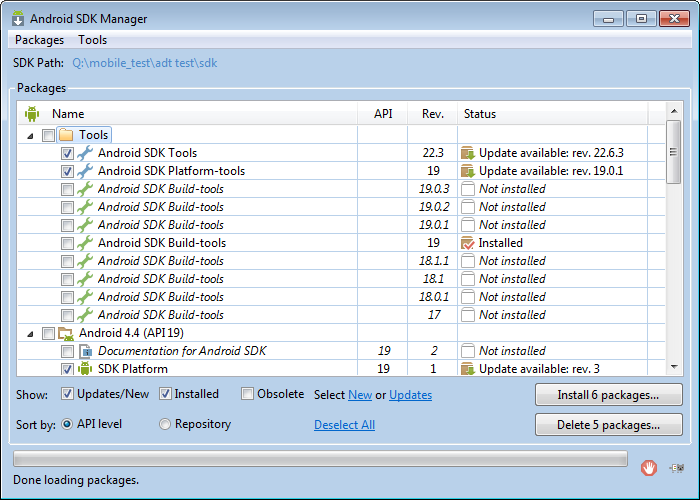
hope you like tick boxes
From there you should install/update the following packages, if they are not installed already:
in Tools:
- Android SDK Tools
- Android SDK Platform-Tools
- Android SDK Build-Tools
in the folder of the most recent Android API:
- SDK Platform
- ARM EABI v7a System Image
- Intel x86 Atom System Image (for the emulator)
in Extras:
- Android Support Library
- Google Play Services [optional]
- Google Play APK Expansion Library [probably optional]
- Google USB Driver
- Intel x86 Emulator Accelerator (HAXM installer) [Unless you are on Linux. Because of reasons.]
Now press the “Install X packages…” button. A new window with a list of selected packages and their licenses will appear. Read them all in their entir- …pressing “Accept License” should accept most of them in one click. Press Install. Feel proud in your ability to press buttons and watch everything install. This might take a while.
Your tool collection should now be prepared for everything covered in this tutorial series.
Now that we are FINALLY done with the setup, we can start Eclipse. (from the eclipse folder)
It will ask for a workspace location – this is the folder where all Projects (read: different applications and their source code/other stuff) will be created as subfolders, so you better put it somewhere clever. (or just use the default for lack of a better idea)
Press OK.
The main window of Eclipse will appear, with the Welcome page, which you can read at your leasure.
When you are done, press the small restore icon in the top right (not the one next to the close button – below that) and behold the general interface of eclipse.
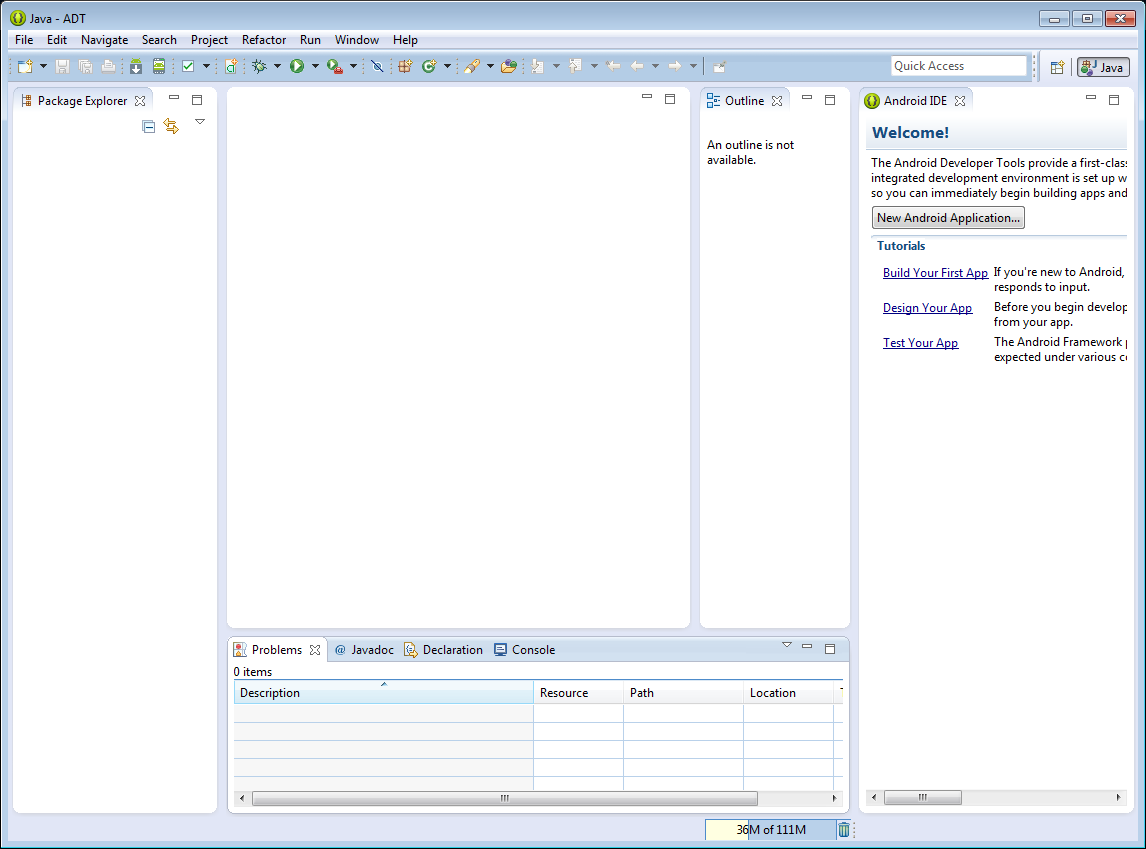
sub-windows are ordered in decreasing usefulness from left to right
The sub-windows you see here are, from left to right (and then bottom):
- the Package Explorer, which is basically like the file tree from your file browser (once you created a Project)
- the unlabled Code Window where all your code or other editing related business will take place
- the Outline Window which will give an outline of the current class loaded
- the Welcome Window, which you should be done with by now
- the Console/Log Window, which gives you various logging messages
Each sub-window you see here has a maximize button which makes their specific sub-window fill the entire screen, and a minimize button which puts it in a sidebar.
With that covered, we can FINALLY start the actual coding. In Chapter II.
If I made a mistake somewhere, or a part needs further explanation here, please point it out in the comments.